

Every educator understands the critical role of empowering students in shaping their future success. By teaching students to take ownership of their learning, we enhance their engagement, critical thinking, self-confidence, and academic achievements—skills crucial for real-world independence. English Language Arts teacher Mary Saylor has effectively mastered this approach. She has significantly boosted her students’ sense of empowerment using nothing more than Google Tasks.
The hack: Utilize Google Tasks to empower students to take charge of their learning
Miss Saylor’s student accountability hack leverages Google Tasks to help students set, monitor, and reflect on their educational goals. Miss Saylor’s strategy engages students in learning, helping them recognize their strengths and weaknesses and boost confidence. This method promotes independence and a reflective learning environment, letting students see progress and understand their actions’ impact. This is the checklist Miss Saylor uses with her students to help them recognize their learning progress:
How to implement Google Tasks with students
Here’s how any teacher can implement this hack in their classroom:
- Setup: Ensure all students can access a computer with a Google account. Teachers also need a Google account and a projector to demonstrate using Google Tasks.
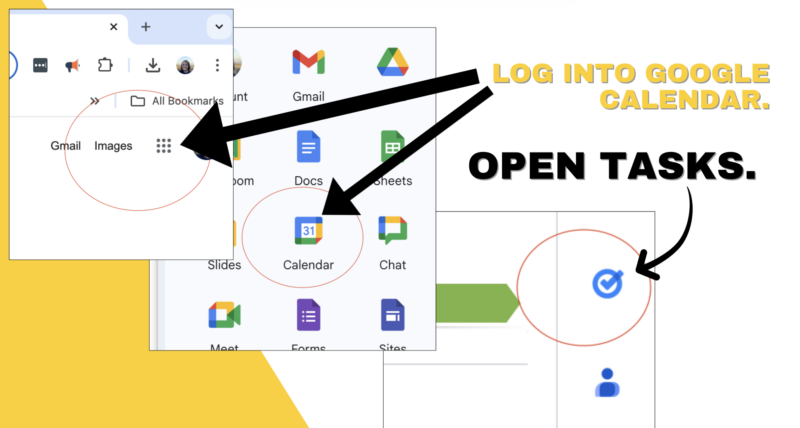
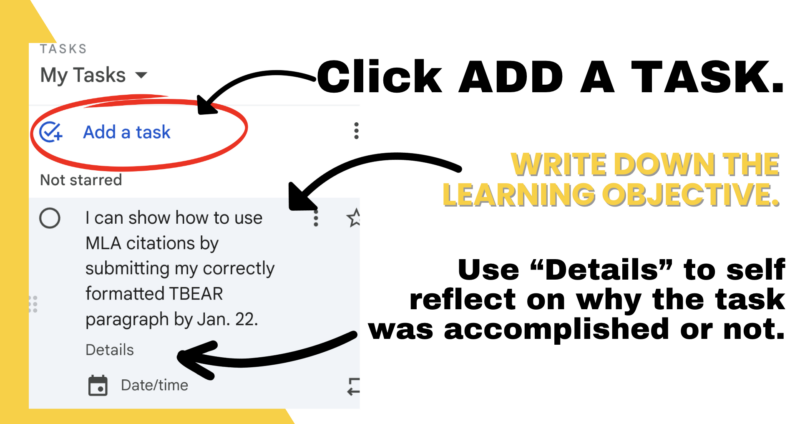
- Creating tasks: Students log into their Google Calendar, create a task, and set it as the learning objective for the day or unit, using student-friendly language and a clear deadline. (See the images Miss Saylor created for us below!)
- Reflection and review: Post-deadline, students review their tasks, adding details in the task’s notes section to reflect on whether and how they achieved their goal.
- Continuous engagement: If the objective is met, students check off the task, archiving it; if not, it remains active until completed.
- Enhanced reflection: Provide students with a structured self-reflection checklist to help them analyze their performance and understand the link between their actions and outcomes. Feel free to use the checklist Miss Saylor provided to the We Are Teachers team!
Benefits of Google Tasks
My former 8th grade students would have loved this cyclical goal-setting throughout our math lessons. They were always looking for more ways to use technology. Plus, who is more aware of themselves and wants to take charge of their own learning than a teenager?! Here are some more added benefits:
- Enhances student engagement: By involving students in goal-setting and accountability, they become more invested in their learning.
- Promotes reflective learning: Continuous self-assessment helps students recognize their learning patterns, essential for academic growth.
- Builds confidence: Regular achievement of set goals boosts students’ confidence and positive feelings toward school, as evidenced by Miss Saylor’s research findings. Miss Saylor found that her students showed a 46% increase in confidence and a 69% increase in positive feelings about school after one semester of consistently using Google Tasks to reflect. Wow!
Additional tips for Google Tasks
Miss Saylor suggests starting small—with just one task—to allow students to get comfortable with the technology. First, try walking them through how to use Google Tasks step-by-step and emphasizing the importance of reflecting on their work. She knows the power of sharing her ups and downs in meeting personal goals, which helps students understand that it’s OK not to be perfect—it’s about trying to do better each time. Plus, this hack is not just for English class—it’s adaptable to any grade or subject. Start the school year with a quick Google Tasks demo, letting teachers incorporate planned reflection and accountability into their lessons. This hack can then become a regular moment for reflection throughout the year.
We think you and your students need this hack!
By blending technology with self-assessment, Miss Saylor’s Google Tasks hack for student accountability teaches responsibility and reflection at every learning target. This increases student engagement and positively shifts their attitudes toward education—and what teacher doesn’t want both of those things in their classroom? Try this hack out for yourself to shake up your classroom dynamics!