
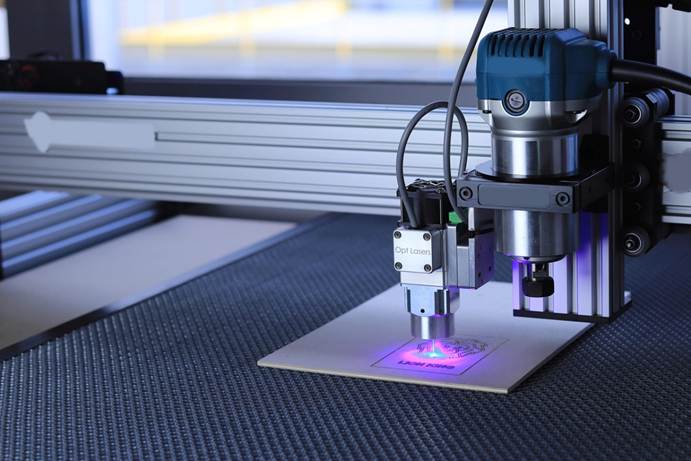
There’s something special about a personalized item. Whether it’s a wine glass etched with someone’s name, a wooden sign with a favorite quote, or a leather wallet with initials carefully carved into it — those details add a human touch. And behind those thoughtful touches? More often than not, it’s an engraving tool doing the magic.
If you’re new to the world of engraving, you might be wondering where to even begin. With so many tools, materials, and techniques out there, it’s easy to feel overwhelmed. But the truth is, engraving is much more approachable than it looks — and once you get the hang of it, it can become a genuinely addictive and rewarding hobby.
So let’s walk through the basics, from what engraving tools actually are, to how to get started with your first project.
So, What Is an Engraving Tool
At its most basic, an engraving tool is any device that lets you cut, scratch, or carve into a surface to create patterns, text, or designs. The simplest form might be a manual scribe that you drag across metal or glass. On the more advanced end, you’ve got laser engraving machines that can etch precise patterns onto everything from wood to acrylic. Somewhere in the middle, you’ll find rotary tools — versatile electric pens that spin at high speed and work with a range of bits. These are great for beginners because they offer control and flexibility without requiring heavy investment.
Other options include manual engraving pens, which are affordable and simple but need a steady hand, and classic tools like chisels or burins, which are still popular among woodworkers and jewelry artists for their precision and artistry. Laser engravers are in a league of their own, using software to direct a laser beam that burns designs into the material. While they can be pricey, their accuracy is unmatched — and ideal if you plan to scale up your engraving work.
What Can You Actually Engrave
One of the best things about engraving is just how many surfaces you can work with. Wood is probably the most forgiving and beginner-friendly material — it’s easy to cut into and produces satisfying results without needing too much finesse. Glass is also a popular choice, especially for gifts, though it does require a bit more patience and care. Metal is incredibly durable and perfect for pet tags, knives, or jewelry, though you’ll want the right bit and tool speed to avoid scratching instead of carving. Leather, plastic, and even stone are also fair game, depending on your tool setup. The key is to always test your engraving method on a scrap piece first to get a feel for how the material reacts.
Finding the Right Tool to Start With
If you’re just dipping your toes into engraving, there’s no need to buy a top-tier laser engraver right away. Most beginners find that a rotary tool — like a Dremel or similar — gives them all the control they need to explore different materials and projects. These tools often come in kits with various attachments, which lets you try everything from delicate detailing on wood to deeper cuts in metal or plastic.
Manual pens can also be a good starting point if you’re mainly interested in small-scale, personal projects and don’t mind putting in a bit of extra effort. They’re especially useful for engraving on-the-go or working on curved surfaces where precision matters more than power. If you’re the type who prefers precision and automation, laser engravers are worth exploring once you’ve got the basics down and want to do more intricate or professional-level work.
Tips for Getting Started (and Not Giving Up)
Starting any new craft comes with a learning curve, and engraving is no exception. The biggest piece of advice? Don’t rush. One of the most common mistakes beginners make is trying to move the tool too fast, which leads to jagged lines, uneven pressure, or even slipping entirely. Take your time, use both hands if possible, and let the tool do the work.
Equally important is using the right bit for the job. A bit that works perfectly on wood might barely scratch glass or even crack it. For glass and ceramics, diamond tips are best. Carbide or tungsten bits are more suitable for metal. And for wood or plastics, you’ll want burr-style tips that can remove material cleanly without burning it.
Another beginner tip: wear safety gear. That might sound over-cautious, but small particles from engraving — especially on glass or metal — can get into your eyes or lungs. A pair of safety glasses and a dust mask go a long way in keeping things safe and comfortable.
Beginner Projects to Try (Without a Big Learning Curve)
You don’t need to start with a grand masterpiece. Some of the most satisfying engraving projects are simple and personal. Try customizing a set of wooden coasters with initials or short quotes — it’s a great way to get a feel for handling your tool and working with curves. Engraving your own glass jar for kitchen spices can turn an everyday item into something unique and display-worthy. Metal keychains, leather luggage tags, and even plastic phone cases are also perfect starter canvases that don’t require perfection to be meaningful.
As you get more confident, you can start incorporating more detailed designs or experimenting with templates and stencils. Before you know it, you’ll be engraving gifts for friends and maybe even selling your creations online.
Avoiding the Pitfalls
Every beginner makes mistakes — it’s part of the process. That said, a few common errors are worth flagging early. First, never try to engrave without securing your material. A moving or sliding piece can not only ruin your design but also damage your tool or cause injury. Always clamp or tape your object down, especially if it’s lightweight.
Also, don’t overlook the importance of tool speed. Engraving too slowly can cause unwanted friction and burns, while going too fast may give you no control at all. Test different speeds on scrap material and trust what feels right. And finally, don’t get discouraged if your first few designs aren’t perfect. The more you practice, the more natural it becomes.
When (and Why) to Upgrade Your Setup
Once you’ve done a few successful projects, you might find yourself wanting cleaner lines, deeper cuts, or faster workflows. That’s when upgrading your gear starts to make sense. A more powerful rotary tool, or a better set of engraving bits, can dramatically improve your results. And if you’re getting serious — maybe even considering selling your work — a desktop laser engraver can take things to the next level. With software control and greater precision, you’ll unlock new creative possibilities, from logo engraving to photo etching.
Final Thoughts
Engraving isn’t just about cutting into surfaces — it’s about adding personal meaning to the things we touch every day. Whether you’re marking a gift with someone’s initials, decorating your favorite tools, or turning a hobby into a side hustle, engraving is one of those rare crafts that’s both creative and practical. And the best part? You don’t need to be a professional artist or invest a fortune to get started. All it takes is a tool, a surface, and the willingness to try. The rest — like every engraved line — comes one step at a time.